
ICT Turtle Soup indicator for NinjaTrader 8
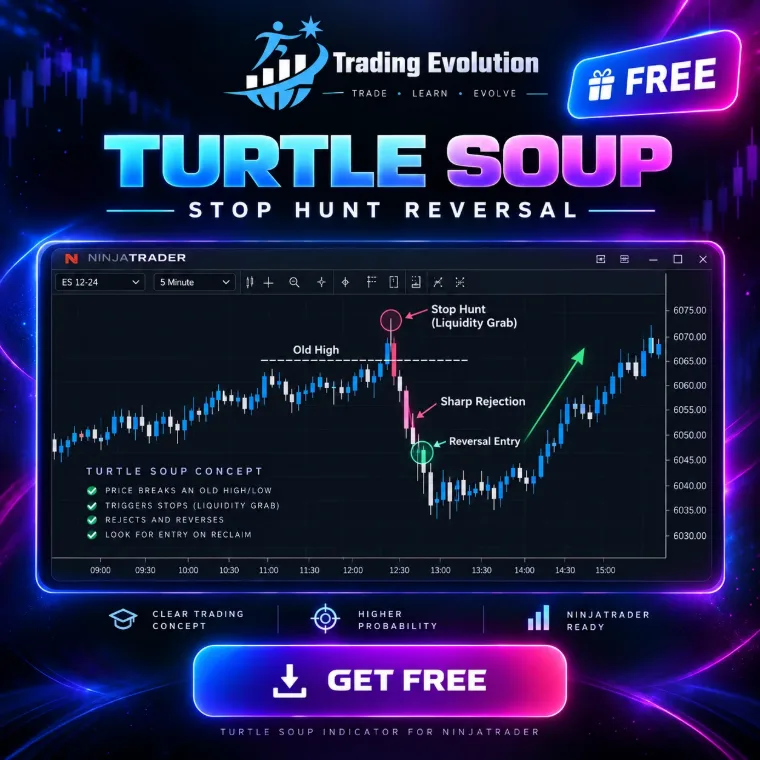
It fades the raid on obvious liquidity: previous day, Asian and London session highs and lows, equal highs and lows, 20-bar extremes and swings. Raid mode enters at the break with a limit just beyond the level; Reclaim mode applies the original Raschke and Connors rule.
The download takes two steps, from the “Free indicators” section of the home page.
- Platform
- NinjaTrader 8
- File
- NinjaScript (.cs), readable source code
- Calculation
- /outils/calculateur-position-futures,Futures position size calculator,How many contracts for a given risk, with each contract’s tick value.
- Price
- Free
- File updated on
- 8 October 2026
How the indicator works
- Liquidity. Swings, equal highs and lows (tolerance in ticks and ATR), the 20-bar channel (original rule), previous day high and low, Asian (20:00-00:00) and London (02:00-05:00) session highs and lows. The raided extreme must be at least 4 bars old.
- Raid mode (default). A limit 1 tick beyond the level, filled at the break, with no confirmation: the stop hunt is anticipated. Stop 8 ticks or 1 × ATR beyond the entry, whichever is larger.
- Reclaim mode. The break must fail with a close back inside, on the same bar (Turtle Soup) or the next one (Turtle Soup Plus One). A raid deeper than 2 × ATR is treated as a real breakout. Stop beyond the raid extreme.
- Trade. Target on the nearest untouched level on the other side that pays at least 2 R (fixed R:R as fallback). Breakeven and maximum bars in trade are available, off by default.
- Display. Liquidity levels (6 per side) with tabs at the right edge, current and past trades; alerts on raid and entry.
Markets and timeframes
- Any instrument loaded in NinjaTrader 8: index futures (ES, NQ…), energy, metals, forex. Thresholds combine a floor in ticks with an ATR multiple, so they stay consistent from one market to the next.
- Times are New York time. With the “NewYorkAuto” reference, the conversion from your chart time zone and daylight saving are handled automatically.
- Calculated on every tick in real time; by default the whole loaded history is analysed.
Requirements
- NinjaTrader 8, a desktop platform for Windows. The indicator is free; NinjaTrader is third-party software with its own terms, and it may cost money depending on how you use it (licence, live trading).
- Data. The chart bars are enough: no Tick Replay or market depth needed. Your connection’s data may cost money depending on the exchange and the subscription.
Settings
Each setting is named exactly as NinjaTrader shows it, with its default value read directly from the source code (.cs).
1. Liquidity
| Setting | Default | What it does |
|---|---|---|
| Swing highs / lows | yes | |
| Swing strength | 3 | Bars on each side of a swing high / low. |
| Equal highs / lows | yes | Two swings at the same price (relative equal highs / lows) hold more stops. |
| Equal tolerance (ticks) | 2 | |
| Equal tolerance (x ATR) | 0.1 | |
| Channel high / low (Raschke & Connors) | yes | |
| Channel length (bars) | 20 | Original rule: 20. |
| Previous day high / low | yes | |
| Asian and London session highs / lows | yes | |
| Asia start (HHMM, NY) | 2000 | |
| Asia end (HHMM, NY) | 0 | |
| London start (HHMM, NY) | 200 | |
| London end (HHMM, NY) | 500 | |
| Min age of the raided extreme (bars) | 4 | Original rule: the prior extreme was made at least 4 bars earlier. |
| Swing lookback (bars) | 300 |
2. Entry
| Setting | Default | What it does |
|---|---|---|
| Entry | Raid | Raid (default) = limit just beyond the level, filled AT the break, no confirmation. Reclaim = original Turtle Soup: the break must fail with a close back inside (same bar, or the next bars: Plus One). |
| Raid offset (ticks) | 1 | How far beyond the level a raid starts (and where the Raid limit sits). |
| Raid stop (ticks) | 8 | Raid mode: stop distance beyond the entry, or the ATR multiple below if larger. |
| Raid stop (x ATR) | 1.0 | |
| Reclaim window (bars) | 1 | 0 = the break bar must close back inside (Turtle Soup). 1 = the next bar may do it (Turtle Soup Plus One). |
| Max raid depth (x ATR) | 2.0 | Reclaim mode: a run deeper than this is a real breakout. 0 = off. |
| Stop buffer beyond the raid (ticks) | 2 | Reclaim mode: stop beyond the raid extreme. |
| Stop buffer beyond the raid (x ATR) | 0.1 |
3. Trade
| Setting | Default | What it does |
|---|---|---|
| Allow longs | yes | |
| Allow shorts | yes | |
| Target | OppositeLiquidity | OppositeLiquidity = the nearest untouched level on the other side that pays the minimum R:R. FixedRR = multiple of the risk. |
| Min distance to target (ticks) | 8 | |
| Min distance to target (x ATR) | 1.0 | |
| Min R:R | 2.0 | |
| Fixed R:R | 2.0 | |
| Fall back to fixed R:R | yes | |
| Breakeven at (R) | 0 | Stop to entry once the trade has run this many R. 0 = off. |
| Max bars in trade | 0 | Turtle Soup is a short term fade: exit at the close after this many bars. 0 = off. |
| ATR period | 14 |
4. Killzones (New York Time)
| Setting | Default | What it does |
|---|---|---|
| Trade only inside killzones | no | Off (default) = the indicator works around the clock. On = raids are only traded inside the enabled killzones. |
| London | yes | |
| London start (HHMM) | 200 | |
| London end (HHMM) | 500 | |
| New York AM | yes | |
| New York AM start (HHMM) | 700 | |
| New York AM end (HHMM) | 1000 | |
| New York PM | yes | |
| New York PM start (HHMM) | 1330 | |
| New York PM end (HHMM) | 1600 | |
| Time reference | NewYorkAuto | NewYorkAuto = New York times (daylight saving handled), converted from the chart time zone. |
| Manual offset (hours) | 0 |
5. Real Time
| Setting | Default | What it does |
|---|---|---|
| Calculate on every tick (real time) | yes | |
| History analysed (bars, 0 = all) | 0 |
6. Display
| Setting | Default | What it does |
|---|---|---|
| Liquidity levels | yes | |
| Levels shown per side | 6 | |
| Level tabs at the right edge | yes | |
| Trades | yes | |
| Labels | yes | |
| Keep cancelled setups | no | |
| Dashboard | yes | |
| Trades kept on chart (0 = all) | 20 | |
| Zone opacity (%) | 20 |
7. Alerts
| Setting | Default | What it does |
|---|---|---|
| Alert when price nears liquidity | no | |
| Near = within (ticks) | 8 | |
| Alert on raid / entry | yes | |
| Alert on target / stop | no | |
| Sound file | Alert4.wav | File name from the NinjaTrader sounds folder (or a full path). Empty = silent. |
| Alert rearm (seconds) | 15 |
8. Trading Evolution
| Setting | Default | What it does |
|---|---|---|
| Show logo | yes | |
| Show name | yes | |
| Logo position | TopLeft | |
| Logo size (px) | 54 | |
| Logo opacity (%) | 55 | |
| Diagnostic mode (Output window) | no |
8 colours you can customise in NinjaTrader's Colours tab.
Installation in NinjaTrader 8
- Download the free pack (ZIP file) that contains the indicator from the Free indicators section of the home page.
- In NinjaTrader 8, open Tools › Import › NinjaScript Add-On, choose the ZIP file, then restart NinjaTrader.
- Activate your free license: Control Center › New › Trading Evolution License, then save your key.
- On a chart, open the indicator list (right-click › Indicators) and add “TRADING EVOLUTION - Turtle Soup”.
Common problems and fixes
- Nothing shows. Load enough history (several days intraday): the model needs swings and complete sessions to detect a setup.
- The indicator is not in the list. Check that the pack import (Tools › Import › NinjaScript Add-On) finished without an error, then restart NinjaTrader. NinjaTrader compiles every script together: an error in another installed script can block the import, so fix or remove that script. If the tool shows a license message, save your free key in Control Center › New › Trading Evolution License.
- “Already contains a definition” error. An older copy of the same indicator exists under another file name: delete it, then compile again.
Limitations
- It is an indicator, not an automated strategy: it sends no orders and manages no positions.
- Thresholds (swing strength, displacement, FVG size, minimum R:R) are setting choices, not official ICT rules. Adjust them to your market and timeframe.
- The “won” or “lost” trades shown refer to the loaded history. They say nothing about future results.
- No signal is guaranteed: futures trading involves a risk of losing capital.
Frequently asked questions
Is the indicator free?
Yes, the indicator is free (free pack and free license), with no subscription. It requires NinjaTrader 8, third-party software with its own terms of use.
Does it place orders?
No. It draws the setups and can play sound alerts, but you decide and you place your own orders.
What is the difference between Raid and Reclaim?
Raid enters during the break, with a limit just beyond the level, without waiting for confirmation. Reclaim waits for the break to fail: a close back inside, on the break bar or the next one.
Where does the name Turtle Soup come from?
The setup was described by Linda Raschke and Laurence Connors to fade the 20-day high / low breakouts traded by the “Turtles”. ICT applies it to liquidity raids; the indicator uses a 20-bar channel, on any timeframe.
Related concepts and tools
Other free NinjaTrader 8 indicators
Related articles
Educational content. These indicators are not investment advice and guarantee no result. Futures trading involves a risk of loss that can exceed the initial investment. Terms of use · Disclaimers