
ICT 2022 Mentorship Model indicator for NinjaTrader 8
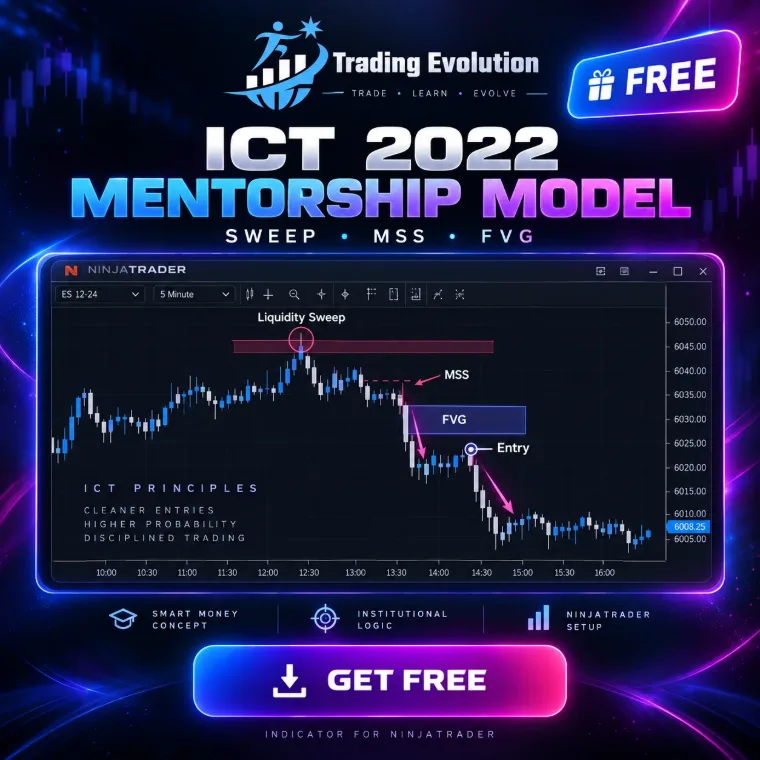
It spots the ICT 2022 sequence on your chart: a liquidity sweep, a market structure shift (MSS) with displacement, then an entry in the Fair Value Gap. The stop goes beyond the sweep wick and the target is the opposite liquidity.
The download takes two steps, from the “Free indicators” section of the home page.
- Platform
- NinjaTrader 8
- File
- NinjaScript (.cs), readable source code
- Calculation
- On every tick (real time)
- Price
- Free
- File updated on
- 20 September 2026
How the indicator works
- Liquidity. It plots liquidity pools: swing highs and lows confirmed by pivot strength, equal highs and lows (EQH / EQL) grouped into one pool, and the previous day’s high and low (PDH / PDL).
- Sweep. Price trades a few ticks through a pool, then closes back on the other side within a few bars. If it does not come back in time, it is a breakout, not a sweep.
- MSS. After the sweep, price breaks the internal reference swing the other way with a displacement candle (body of at least 0.9 × ATR by default), confirmed on close.
- FVG. The Fair Value Gap left by the displacement becomes the entry zone: Proximal, CE (50%) or Distal. Without an FVG the setup is skipped, unless you allow the order block fallback.
- Trade. Stop beyond the sweep wick plus a buffer, target at the opposite liquidity or at a fixed R:R. Setups below the minimum R:R (2 by default) are skipped.
- Tracking. Labels and the dashboard show the state of each setup: waiting for the MSS or the FVG, armed, in position, won, lost or expired.
Default sessions and killzones
By default the indicator works around the clock: the session filter is off and sessions are only coloured in the background. Tick “Filtrer les signaux par session” to keep only sweeps that happen inside an active session.
| Session | Start | End | Status |
|---|---|---|---|
| London | 02:00 | 05:00 | on |
| NY AM | 07:00 | 10:00 | on |
| Silver Bullet | 10:00 | 11:00 | on |
| NY PM | 13:30 | 16:00 | on |
| Asia | 20:00 | 00:00 | on |
| Perso | 00:00 | 00:00 | off |
Markets and timeframes
- Any instrument loaded in NinjaTrader 8: index futures (ES, NQ…), energy, metals, forex. Minimum sizes combine a floor in ticks with an ATR multiple, so they stay consistent across markets.
- Any timeframe. The session filter has no effect on daily and higher charts.
- Calculated on every tick in real time. Historical Tick Replay is not required.
Settings
Values read directly from the indicator's source code. NinjaTrader shows the setting labels in French, so each one is given with its English meaning.
1. ICT 2022 model
| Setting | Default | What it does |
|---|---|---|
| Swing strength (pivots)Force des swings (pivots) | 3 | Bars on each side required to confirm a swing high/low (liquidity pool). |
| MSS reference swing strengthForce du swing de reference MSS | 2 | Strength of the internal pivot used as the level to break for the market structure shift. |
| Reference swing lookback (bars)Recherche du swing de reference (bougies) | 60 | Maximum lookback to find the reference pivot before the sweep. |
| Minimum sweep overshoot (ticks)Depassement mini du sweep (ticks) | 1 | Ticks beyond the liquidity level required to count as a sweep. |
| Max bars from raid to valid sweepBougies max raid -> sweep valide | 3 | If price does not close back below/above the level within this window, it is a breakout, not a sweep. |
| Max bars from sweep to MSSBougies max sweep -> MSS | 25 | Maximum delay to get the structure shift after the sweep. |
| MSS allowed on the sweep barMSS autorise sur la bougie du sweep | yes | Accepts a sweep and a displacement on the same bar. |
| MSS confirmed on closeMSS valide sur cloture | yes | Requires a close beyond the structure level (otherwise a wick is enough). |
| ATR period (displacement)Periode ATR (displacement) | 14 | ATR period used to measure displacement strength. |
| Minimum displacement (× ATR)Displacement mini (x ATR) | 0.9 | Body of the break candle as a multiple of ATR. 0 = filter off. |
| Require an FVGExiger un FVG | yes | No FVG, no trade. If unchecked, it falls back to the displacement order block. |
| FVG grace barsBougies de grace pour le FVG | 2 | Bars after the MSS during which the FVG may still form. |
| Minimum FVG size (ticks)Taille mini du FVG (ticks) | 1 | Absolute floor in ticks. The threshold applied is the larger of this floor and the ATR multiple below. |
| Minimum FVG size (× ATR)Taille mini du FVG (x ATR) | 0.05 | Makes the filter work on any market: 0.05 = the FVG must be at least 5% of ATR. 0 disables it. |
| Entry level in the FVGNiveau d'entree dans le FVG | CE | Proximal = first touch, CE = 50% (consequent encroachment), Distal = full fill. |
2. Trade management
| Setting | Default | What it does |
|---|---|---|
| Target typeType d'objectif | OppositeLiquidity | Opposite liquidity (draw on liquidity) or fixed R:R. |
| Fixed R:RR:R fixe | 3.0 | Target as a multiple of risk when fixed R:R mode is selected (or as a fallback). |
| Minimum R:RR:R minimum | 2.0 | Setups below this ratio are ignored. |
| Stop buffer (ticks)Marge du stop (ticks) | 2 | Absolute floor in ticks beyond the sweep wick. |
| Stop buffer (× ATR)Marge du stop (x ATR) | 0.05 | Volatility-based buffer so the stop has the same room on every market. The larger of the two applies. |
| Armed setup lifetime (bars)Duree de vie du setup arme (bougies) | 30 | Beyond this, an untriggered setup expires. |
| Max time in position (bars)Duree max en position (bougies) | 120 | The trade is closed for the statistics after this many bars. |
| Allow longsAutoriser les achats | yes | |
| Allow shortsAutoriser les ventes | yes |
3. Liquidity
| Setting | Default | What it does |
|---|---|---|
| Detect equal highs/lows (EQH/EQL)Detecter les egalites (EQH/EQL) | yes | Groups near-identical swings into a single liquidity pool. |
| Equal-level tolerance (ticks)Tolerance des egalites (ticks) | 4 | Absolute floor in ticks to group two swings into one pool. |
| Equal-level tolerance (× ATR)Tolerance des egalites (x ATR) | 0.10 | Volatility-based tolerance. The larger of the two applies. |
| Add PDH / PDLAjouter PDH / PDL | yes | Adds the previous day's high and low (New York day) as liquidity pools. |
| Level memory (bars)Memoire des niveaux (bougies) | 500 | |
| Bars analysed (0 = all)Historique analyse (bougies, 0 = tout) | 0 | Limits the calculation to the last N bars to speed up loading. |
| One setup at a time per directionUn seul setup a la fois par sens | yes | Checked: while a setup is armed or in position, new sweeps in the same direction are ignored. Unchecked: every valid setup is taken, even simultaneously. |
4. Trading sessions
| Setting | Default | What it does |
|---|---|---|
| Filter signals by sessionFiltrer les signaux par session | no | Unchecked = the indicator works around the clock (default). Checked = only sweeps inside an active session are kept. No effect on daily and higher timeframes. |
| Show sessions on the chartAfficher les sessions sur le graphique | yes | Colours the background of active sessions, even when filtering is off. |
| Show session namesAfficher le nom des sessions | yes | |
| Time referenceReference horaire | NewYorkAuto | NewYorkAuto = session times are New York time, converted automatically from the chart's time zone. ChartTime = times are read directly in the time shown by the chart. |
| Manual offset (hours)Decalage manuel (heures) | 0 | Used only when Time reference = ManualOffset. |
5. Real time
| Setting | Default | What it does |
|---|---|---|
| Calculate on each tick (real time)Calcul sur chaque tick (temps reel) | yes | On by default: the chart updates on every tick with nothing to configure. Uncheck only to work on bar close. |
| Info message in the Output windowMessage d'info dans l'Output | no | Prints in the Output window which precision is being used. Historical Tick Replay is enabled in F6 > Data Series; it is not required. |
6. Display
| Setting | Default | What it does |
|---|---|---|
| Liquidity levelsNiveaux de liquidite | yes | |
| Sweep markerMarqueur de sweep | yes | |
| MSS lineLigne MSS | yes | |
| FVG / OB zoneZone FVG / OB | yes | |
| Entry / stop / targetEntree / stop / objectif | yes | |
| LabelsEtiquettes | yes | |
| DashboardTableau de bord | yes | |
| Setups displayed (0 = whole chart)Setups affiches (0 = tout le graphique) | 50 | Number of setups kept on screen. 0 = all, across the whole loaded history. |
| Zone opacity (%)Opacite des zones (%) | 22 | |
| Session background opacity (%)Opacite du fond des sessions (%) | 7 |
7. Alerts
| Setting | Default | What it does |
|---|---|---|
| Alert on sweepAlerte sur sweep | no | |
| Alert on MSSAlerte sur MSS | no | |
| Armed setup alertAlerte setup arme | yes | |
| Entry triggered alertAlerte entree declenchee | yes | |
| Sound fileFichier son | Alert1.wav | Name of a file in NinjaTrader's sounds folder. |
| Alert re-arm delay (s)Rearmement des alertes (s) | 15 |
8. Trading Evolution
| Setting | Default | What it does |
|---|---|---|
| Show logoAfficher le logo | yes | |
| Show nameAfficher le nom | yes | |
| Logo positionPosition du logo | TopLeft | |
| Logo size (px)Taille du logo (px) | 54 | |
| Logo opacity (%)Opacite du logo (%) | 55 | |
| Diagnostic mode (Output)Mode diagnostic (Output) | no |
17 colours you can customise in NinjaTrader's Colours tab.
Installing it in NinjaTrader 8
- Download the .cs file from the Free indicators section of the home page.
- Copy it into the
Documents\NinjaTrader 8\bin\Custom\Indicatorsfolder. - In NinjaTrader, open the NinjaScript Editor (New › NinjaScript Editor) and compile with F5.
- On a chart, open the indicator list (right-click › Indicators) and add “TRADING EVOLUTION - ICT 2022”.
Limitations
- It is an indicator, not an automated strategy: it sends no orders.
- Thresholds (pivot strength, displacement, FVG size) are configuration choices, not official ICT rules. Adjust them to your market and timeframe.
- On history without Tick Replay, the calculation uses bar data; in real time it runs on every tick.
- “Won” or “lost” results shown on screen refer to the loaded history. They say nothing about future results.
- No signal is guaranteed: false sweeps, MSS that go nowhere and ignored FVGs are part of the market.
Frequently asked questions
Is the ICT 2022 indicator free?
Yes, the .cs file is free. It needs NinjaTrader 8, third-party software with its own terms.
Does it place orders?
No. It draws setups and can send alerts, but you make the decisions and place your own orders.
Do I need to enable Tick Replay?
No. It calculates on every tick in real time with no setup. Historical Tick Replay (F6 › Data Series) is still available if you want the same precision on history.
Which time zone are the killzones in?
New York time. With the “NewYorkAuto” reference, conversion from your chart’s time zone is automatic.
Related concepts and tools
Educational content. These indicators are not investment advice and guarantee no result. Futures trading involves a risk of loss that can exceed the initial investment. Terms of use · Disclaimers